Wurst Table Layout started as a practical answer to one of Warcraft III UI’s most annoying problems: placing frames without hand-writing piles of fragile point math.
It has now grown into something much bigger: a complete WurstScript UI toolkit for building polished WC3 interfaces from start to finish.
From Layout Engine to UI Toolkit
At the core is still the table/flexbox-style layout engine. You build rows, add cells, set padding and gaps, opt into column alignment when a form or roster needs it, and let the library do the positioning work.
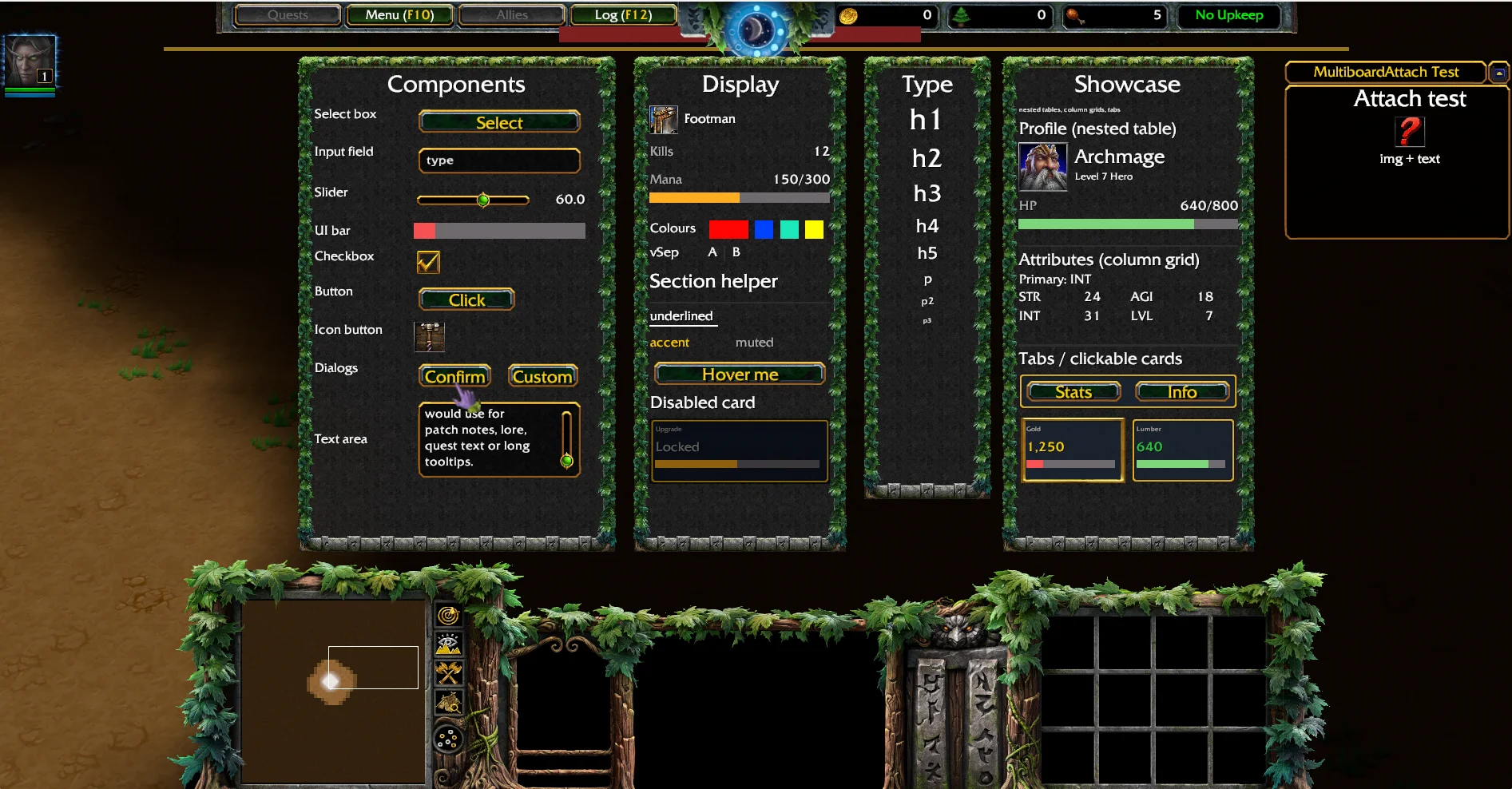
But the library now reaches far beyond layout. It includes ready-made components for common map UI:
- panels, cards, containers, sections, separators and spacers
- text presets, icon rows, label/value rows and stat cards
- buttons, icon buttons, checkboxes, sliders, selects, edit boxes and text areas
- tooltips, tabs, confirm dialogs, progress bars and stat bars
- SimpleFrame helpers for boss bars, tinted HUD art and full-width band elements
- named helpers for hiding or modifying default WC3 UI pieces like the minimap, command card, day/night clock and resource bar
That means a setup panel, options menu, scoreboard, boss health bar or custom HUD element can usually be assembled from existing helpers instead of raw BlzCreateFrame calls.
let difficulty = select("Difficulty", 0.12)
    ..addOption("Easy")
    ..addOption("Normal")
    ..addOption("Hard")

let setup = panelTable(0.26, 0.15, "Setup")
setup
..gap(SPACE_S)
..row()..add(h2("New Game")..setSize(0.16, 0.022))
..row()..add(label("Difficulty", 0.08))..add(difficulty.create())..growX()
..row()..add(label("Name", 0.08))..add(textInput("", 0.12).create())..growX()
..row()..add(textButton("Start", 0.10, 0.026))

setup.build().placeSafe(vec2(0.5, 0.5), 0.26, 0.15)
No manual anchoring. No duplicated frame boilerplate. No guessing whether the panel will sit on top of the command card.
Interaction Helpers for Existing Frames
One especially useful addition is the set of interaction helpers for frames that were originally only visual.
Need a whole card, row or icon tile to behave like a selectable item? Use interactive(frame) or selectable(frame). The helper adds the click target, hover behavior, selected state, disabled state and tooltip support around the existing display frame.
This matters because WC3 frame input is full of edge cases. Decorative children can swallow mouse input, transparent frames can still block clicks, and keyboard focus can get stuck after pressing a button. Wurst Table Layout wraps those details into reusable helpers so map code can describe intent instead of re-learning frame quirks.
Safe Defaults
The library is opinionated in the good way: the default path is meant to be the sane path.
Buttons release keyboard focus automatically after click, so Enter keeps opening chat instead of re-triggering the last clicked control. Components clamp to minimum sizes where needed. SPACE_XS through SPACE_XL give layouts a consistent spacing scale. panel, card, container and section establish a small hierarchy for building interfaces that look coherent without layering backdrop inside backdrop.
Placement also has guard rails. placeSafe keeps ordinary panels clear of the melee HUD, while placeVisuallySafe exists for deliberate sidecar UI that can use more of the visible 4:3 area. Default HUD access is named and cached through TableUiDefaultUi, so you can hide the day/night clock or command buttons without memorising child indices and patch-specific quirks.
Headless Layout Verification
The most exciting part for larger projects might be validation.
Warcraft III cannot measure UI text the way modern browser layout can, and fixed-size text frames can collapse if you forget to size them. Wurst Table Layout now exposes checkFits() and inspect() so layouts can report zero-size cells, row overflow and vertical overflow before you ship them.
That check works without launching Warcraft III. You can model the layout in a Wurst unit test and run it through grill test:
@Test
function setupPanelFits()
    let t = new TableLayout(0.24, 0.16, "SetupPanel")
    t..row()
        ..addSized(0.06, 0.02)..text("Name", FONT_P)
        ..addSized(0.12, 0.02)..growX()

    t.checkFits().assertTrue()
    destroy t
For UI-heavy maps, that is a huge shift: layout mistakes become test failures instead of screenshots, player reports, or late-night pixel hunting.
Built for Humans and Agents
The repository also ships with agent-readable documentation: AGENTS.md, AI_USAGE.md and WC3_FRAMEHANDLE_GUIDE.md.
These are not just generic notes. They contain a decision tree for choosing components, copy-pasteable recipes, framehandle safety rules, known WC3 quirks, validation patterns and a checklist for finishing UI work. That makes the library unusually friendly to AI coding agents, but it is just as valuable for humans returning to UI work after a few months away.
The result is a library that encodes a lot of hard-earned Warcraft III UI knowledge into small, composable APIs:
- use layout tables instead of manual point math
- use components before raw frames
- use interaction helpers before inventing click overlays
- validate layouts headlessly
- keep multiplayer UI safe by default
Install it with grill:
grill install https://github.com/Frotty/wurst-table-layout
If your map needs custom UI, Wurst Table Layout is now one of the fastest ways to get from idea to working, styled, verified interface.